Android app is out: your air sensors in your pocket
The map now has a companion on your phone. Add the sensors you care about, see their readings at a glance, and get a notification when the air turns Poor or a sensor goes quiet.
The sensors.social map shows every sensor in the network. Most of us, though, care about a few of them: the one on our balcony, the one at a friend’s place across town, the one near the school. The sensors.social app for Android keeps those few one tap away and tells you when their air turns bad.
No account and no sign-up. The app talks to the open sensors.social data directly, and your list of sensors stays on your phone.
The app is an APK on GitHub, for Android 7 or newer. Open the latest release, download the .apk file and open it: Android asks to allow installs from your browser once.
Add a sensor
Tap Add a sensor. There are three ways in.
By its name. Every sensor on the map has a two-word name, like Auburn Horseradish, and every owner has one too, like Slender Scorpion. Start typing and the app suggests the sensors and owners it finds on the map. Pick an owner and all of their sensors come in at once.
By its QR code. Open a sensor on the map, go to its Share tab and point the phone at the code. Each sensor’s QR code lives there, next to a short how-to.
By its address. Paste a sensor’s or owner’s address, for when someone sends it to you.
Your sensors at a glance
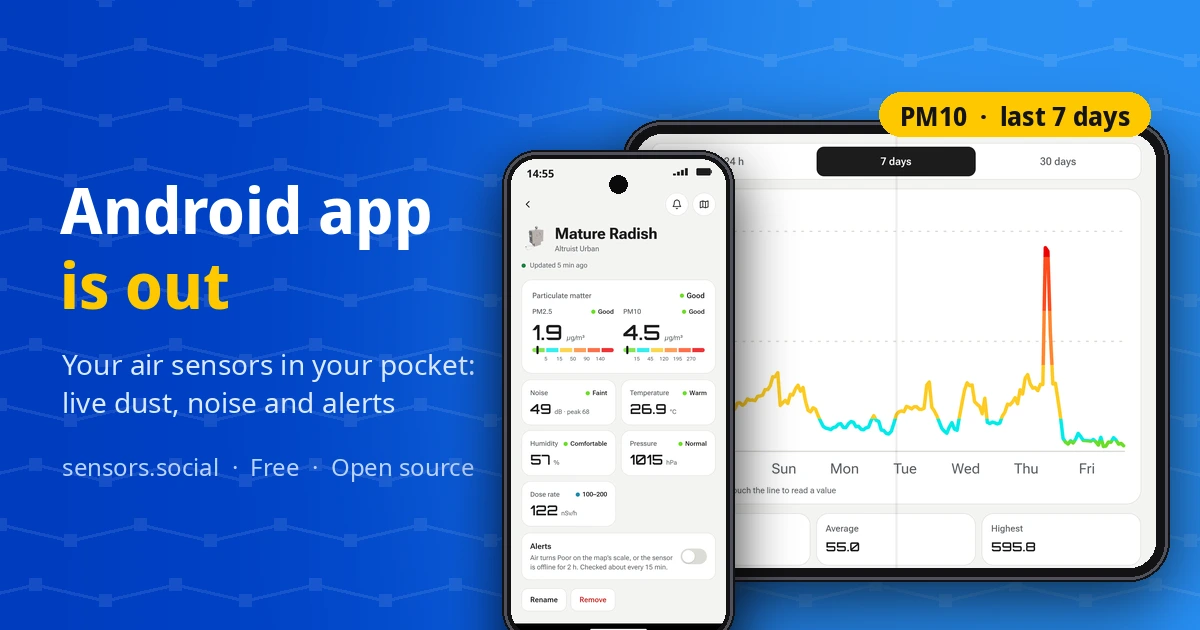
The home screen lists the sensors you follow with their latest readings: PM2.5 and PM10 for an Altruist Urban, CO₂ for an Altruist Insight, plus noise, temperature and humidity. The colours follow the same air quality scale as the map, so green here means the same as green there.
Tap a sensor for its own screen: each value with its scale, the noise peak and pressure. Tap a value for its chart over 24 hours, 7 days or 30 days. You can rename a sensor to something you will recognise, like “Balcony” or “Grandma’s”.
Alerts
Turn on Alerts for a sensor and the app checks it about every 15 minutes. You get a notification when the air turns Poor on the map’s scale, and when the sensor has been silent for two hours, so you know to check its power or Wi-Fi.
The checks run on your phone. There is no server that knows which sensors you follow. Test notification shows what an alert looks like.
Set up a new Altruist
Just unboxed an Altruist? Set up a new Altruist walks you through it in four steps: power it on, join its Wi-Fi, connect it to your home network, and put it on the map. The app moves the point on the map by about 100 metres, so the map shows your area, not your door. The new sensor appears in your list with alerts already on.
The map, one tap away
The map button opens sensors.social over the app, on the sensor you are looking at, with its full history, the wind, dust and smoke layers and the sensors around it.
The app is open source under AGPL-3.0, like the map: code on GitHub. Light and dark themes follow your phone. Found a bug or missing something? Write to us through Support.